2026 Comparison

    Best receipt app in 2026: why you should stop managing your bills like an accountant

    An honest comparison of what's on the market — and why most of these tools were never built for you.

    R
    ReFound Team
    ·8 min read

    We all have that infamous drawer or shoebox overflowing with paper receipts. Sometimes the ink fades before you can even return the item to the store. Other times you're staring at a bank statement with a cryptic line that reads MERCH SKU 847291 without the faintest idea what you bought at Canadian Tire or Home Depot three weeks earlier.

    If you're looking for the best receipt app, you've probably noticed the market is flooded with two types of tools: heavy accounting software built for businesses, and cash-back apps that take a little too much interest in your private life.

    But what about your everyday personal purchases, your in-store returns and your warranty tracking?

    Read our comparison of receipt scanner apps to understand how a new generation of apps is changing the game without trading your data away.

    Comparison: which receipt app should you choose in 2026?

    Fig. 1 — A side-by-side look at the four main categories of receipt apps available in Canada.

    ← Swipe to see more →

    Features
    ReFound
    The featured app
    Cash back appsCheckout 51, Receipt Hog-styleExpense report appsExpensify-style — for workBasic scannersAdobe Scan-style — digitizing
    Main purposeReturns, warranties & purchase trackingEarn a few cents in exchange for your receiptsPro expense reports & taxesSimple PDF scanning
    PrivacyStrict — no data resaleLow — sells your purchase data to brandsProfessional — secured business dataHigh — files stored in your cloud
    Receipt readingSmart — real product names & imagesMarketing — looks for partner brandsAccounting — extracts total & tax onlyRaw — unsorted text
    Returns & warranty handlingYes — alerts + checkout barcodeNoNoNo
    PriceFree"Free" — monetized via your dataPaid — monthly subscriptionFree with paid options

    1.The problem with traditional expense report apps

    When you search for an OCR receipt scanner or a top expense app for 2026, Google often surfaces accounting heavyweights. While these tools are extremely efficient for businesses, they're clunky for an individual. They sort your purchases by tax categories (travel expenses, business meals) rather than by product, and most advanced features require a costly monthly subscription.

    2.The cash-back app trap: your data has a price

    At first glance, cash-back receipt apps look appealing. You scan your receipt, you accumulate fractions of a dollar. But ask yourself: how do these apps actually make money? The answer is simple: they sell your consumption data.

    By scanning your receipts, you give them unlimited access to your lifestyle habits, your preferred brands, the frequency of your purchases and your budget. These ultra-precise profiles are then resold to ad networks and large manufacturers to target you even more effectively. Plus, to actually cash out, you usually need to hit a minimum threshold (often $20), which takes months to reach for a tiny payout.

    ReFound: the consumer shopping assistant that protects your wallet and your privacy

    To counter both accounting bloat and ad-driven spying, the Canadian app ReFound took the opposite path from the rest of the market. Instead of targeting businesses or data brokers, it speaks directly to consumers with a promise of real, everyday usefulness.

    The idea: turn your passive paper receipts into smart tools that simplify your returns and track your warranties, with absolute respect for your privacy.

    Critical criterion

    1.A strict "No-Data-Selling" policy

    This is the critical point. ReFound is a personal productivity tool, not a disguised ad network. Your purchase data is never sold, rented or shared with third parties. What's on your receipt is between you and your retailer.

    2.Goodbye gibberish: meet visual receipts

    Most apps just read the raw text of a receipt without understanding it. ReFound uses advanced recognition technology to decode receipts. The app turns cryptic product codes (the famous SKUs) into real product names with clear images. You know instantly what's on each receipt at a glance.

    3.A "ready-to-return" view for the store

    This is ReFound's flagship feature. The app automatically integrates and tracks the return policies of major Canadian retailers (IKEA, Walmart, Canadian Tire, Costco, RONA, Home Depot, Best Buy, Decathlon, BMR, Canac, Dollarama, Giant Tiger, etc.).

    • It calculates the deadline to bring an item back.
    • It sends you a reminder before it's too late.
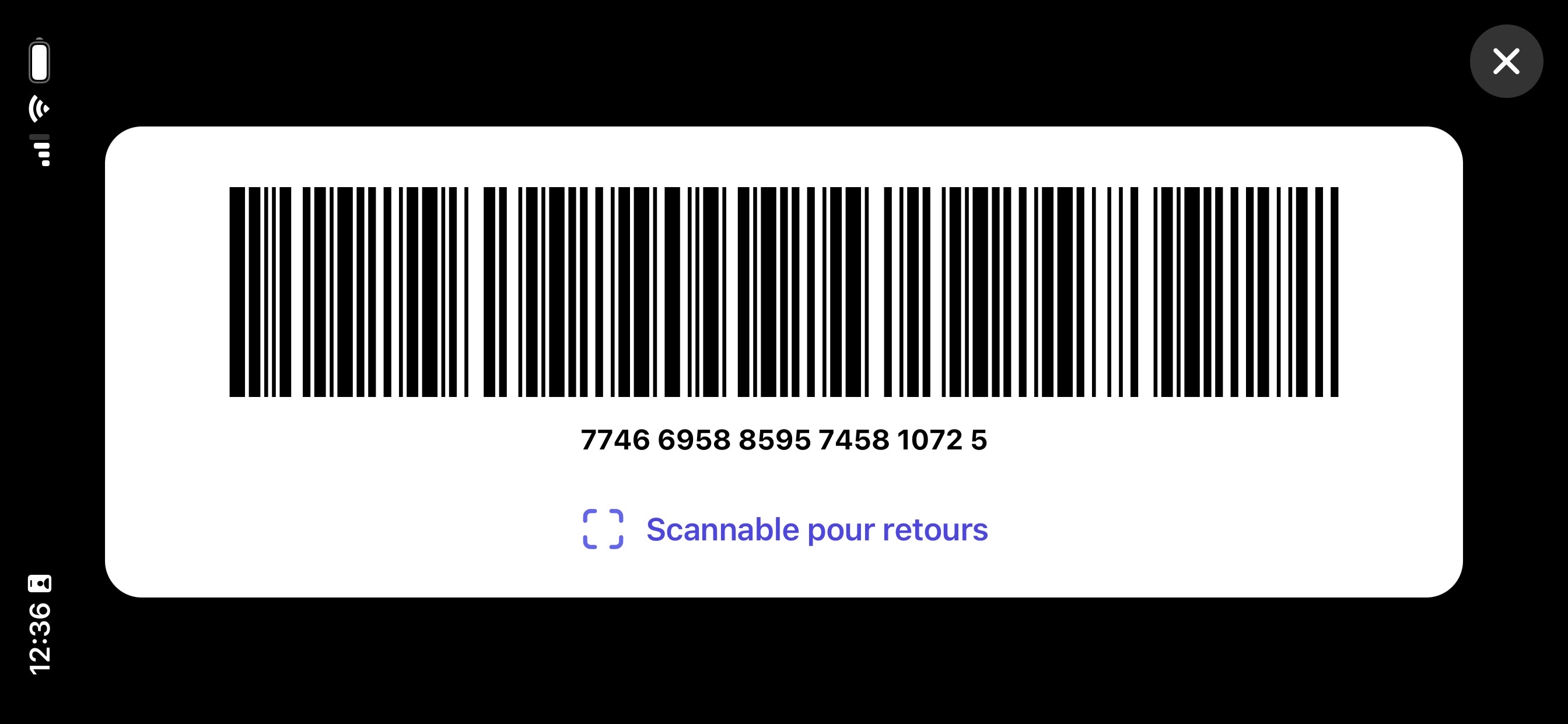
    • In-store, the app generates a barcode the cashier can scan directly, with the relevant item visually highlighted. No more checkout stress.

    4.The guardian of your warranties

    An electronic device that dies after 6 months? A defective snow blower? Finding the paper warranty is often a nightmare. ReFound extracts warranty information from your receipts and alerts you before they expire. You'll never lose money again because of a misplaced or faded piece of paper.

    The 3 criteria that really separate these apps

    Beyond tool categories, three technical criteria separate receipt apps. These are the three fundamentals ReFound was built on:

    1. OCR accuracy

    A misread receipt is proof of purchase you can no longer use. ReFound is powered by Google Vision, top-ranked in independent OCR benchmarks (98% accuracy), plus Gemini for hard-to-read receipts.

    See ReFound's OCR accuracy

    2. Secure cloud storage

    Your receipts should not vanish with a lost or broken phone. They stay private and protected, with the option to turn on cloud backup so you can find them when you need them. ReFound's main database is hosted in Canada.

    See the secure cloud storage

    3. Categories and filters

    Automatic and custom categories, filters by store, payment card or amount, and search by real product name rather than SKU code.

    See the categories and filters

    For the full breakdown of these three criteria, with a comparison table: How to Choose a Receipt App: 3 Key Criteria (2026)

    Verdict: which receipt app should you install?

    The right app depends entirely on your profile:

    • Choose a pro expense app (like Expensify) if you're an employee who needs to get reimbursed for expenses by your employer.
    • Choose a cash back app (like Checkout 51) if you're OK with your shopping habits being analyzed and resold in exchange for a few dollars a year.
    • Choose ReFound if you're an individual or family in Canada looking for a free tool to simplify your returns, protect your warranties effectively, while keeping your data private and protected.

    The ReFound app is available for free on iOS. Ready to clear your wallet of paper receipts without selling your privacy?

    Download the app and take back control of your purchases today.

    Download on the App Store
    R

    ReFound Team

    We write about receipt management, in-store returns and Canadian consumer rights.